 TokenSave
Nano Banana Pricing & Free Limits (2026)
Jonhisking · October 15, 2026
Nano Banana is one of those products whose price is hard to pin down. The name keeps moving between models, Google bills images as output tokens rather than as images, and the pricing table is split by model and by resolution. On top of that, two things changed in early October: Nano Banana 2.1 became generally available on October 6, and the original Nano Banana (Gemini 2.5 Flash Image) was shut down in the API on October 2. A lot of the per-image numbers you will find in older articles now point at a model you can no longer call.
So I went back to Google's official pricing page (the version updated October 13, 2026) and worked out what each model costs per image, what you can still do for free, and what real workloads come to in dollars. I also ran the same two English prompts through the free Gemini app, Nano Banana 2.1 and Nano Banana Pro to see whether paying more actually buys you a better picture.
All prices are in US dollars and exclude sales tax.
How many Nano Banana models are there?
As of October 14, 2026, four image models are sold under the Nano Banana name in the Gemini API.
| Name | Model ID | What it is for |
|---|---|---|
| Nano Banana 2.1 | gemini-nano-banana-2.1 | Generally available since October 6. Google's recommended default for new projects |
| Nano Banana 2 | gemini-3.1-flash-image | The previous default. The only one with a 0.5K option |
| Nano Banana 2 Lite | gemini-3.1-flash-lite-image | Fastest and cheapest to call. 1K only, weaker at multi-image references and multi-turn edits |
| Nano Banana Pro | gemini-3-pro-image | The top model. Built for complex scenes, text rendering and brand consistency |
The original Nano Banana, gemini-2.5-flash-image, is listed in Google's documentation as shut down on October 2, 2026. If you see "$0.039 per image" quoted somewhere, that was the price of this retired model, not of anything you can buy today. Code that still calls gemini-2.5-flash-image will return an error and needs a new model ID.
Every image from every Nano Banana model carries a SynthID watermark, an invisible marker that identifies the picture as AI-generated. You can't switch it off on any tier.
How much does the Nano Banana API cost per image?
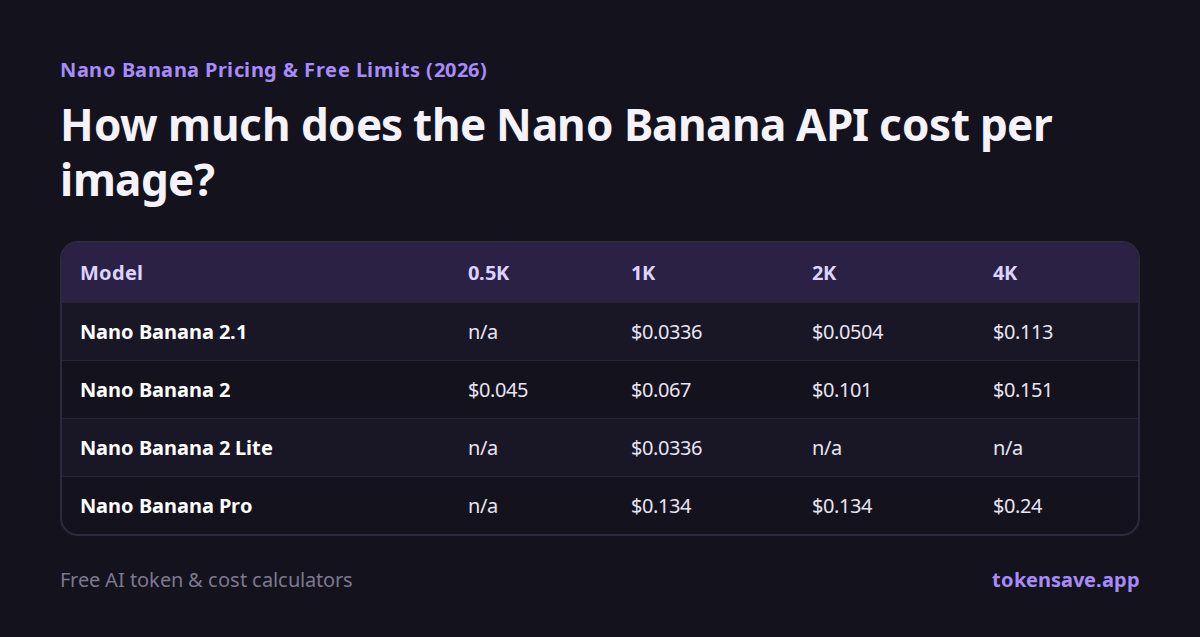
Google meters image output in tokens. Nano Banana 2.1, for example, charges $30 per million output image tokens, and a 1K image (1024×1024) counts as 1,120 tokens, which works out to $0.0336 per image. Converted the same way, here is the per-image price for a standard request.
| Model | 0.5K | 1K | 2K | 4K |
|---|---|---|---|---|
| Nano Banana 2.1 | n/a | $0.0336 | $0.0504 | $0.113 |
| Nano Banana 2 | $0.045 | $0.067 | $0.101 | $0.151 |
| Nano Banana 2 Lite | n/a | $0.0336 | n/a | n/a |
| Nano Banana Pro | n/a | $0.134 | $0.134 | $0.24 |
A few things in that table are easy to miss.
- 2.1 is cheaper than 2. The newer model costs half as much at 1K ($0.0336 against $0.067). The catch is on the input side: 2.1 charges $1.50 per million input tokens, up from $0.50 on Nano Banana 2. If your workflow feeds in several reference photos and long instructions for every edit, run the input numbers too before you assume you are saving money.
- 2.1 and Lite cost the same per 1K image. Both are $0.0336. Lite's input is cheaper ($0.25 per million tokens) and it is faster, but Google says it only renders 1K and is not the model for multi-image references or back-and-forth editing.
- Pro charges the same for 1K and 2K. If you are paying for Pro anyway, ask for 2K.
- 4K is still noticeably more expensive. Even on 2.1, a 4K image is $0.113, about 236% more than 1K. For web pages and social posts, 1K or 2K is usually plenty.
How much does Batch save?
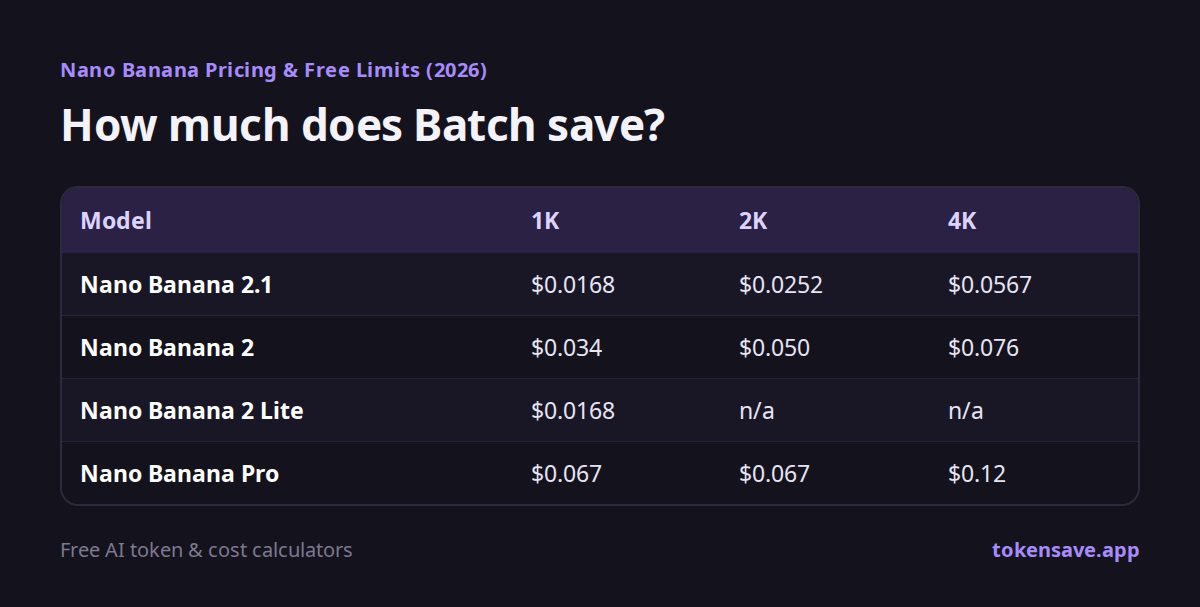
If you don't need the image back right away, send the job through the Batch API and you pay 50% of the standard rate. Google's target turnaround is 24 hours, and most jobs finish sooner.
| Model | 1K | 2K | 4K |
|---|---|---|---|
| Nano Banana 2.1 | $0.0168 | $0.0252 | $0.0567 |
| Nano Banana 2 | $0.034 | $0.050 | $0.076 |
| Nano Banana 2 Lite | $0.0168 | n/a | n/a |
| Nano Banana Pro | $0.067 | $0.067 | $0.12 |
Nano Banana 2 also offers 0.5K in Batch for $0.022. Batch fits jobs where you generate a lot and pick later: a full catalogue of product shots, a few hundred item icons for a game, or variations of an ad you want to A/B test next week.
Is the Nano Banana API free?
No. On Google's pricing page, the Free tier column reads "Not available" for Nano Banana 2.1, 2, 2 Lite and Pro alike. Unlike the text models, getting an API key is not enough to generate images at no cost. You can only call the image models from a paid-tier project with billing turned on. The trade-off is that, on the paid tier, Google does not use your prompts and outputs to improve its products.
There are two ways to try Nano Banana for free:
- The Gemini app (web and mobile). Google's help center lists "Generate images with Nano Banana 2" as available on every plan, including accounts with no AI plan.
- Google AI Studio. The developer playground. My results there are further down.
How many images can you make on the free Gemini app?
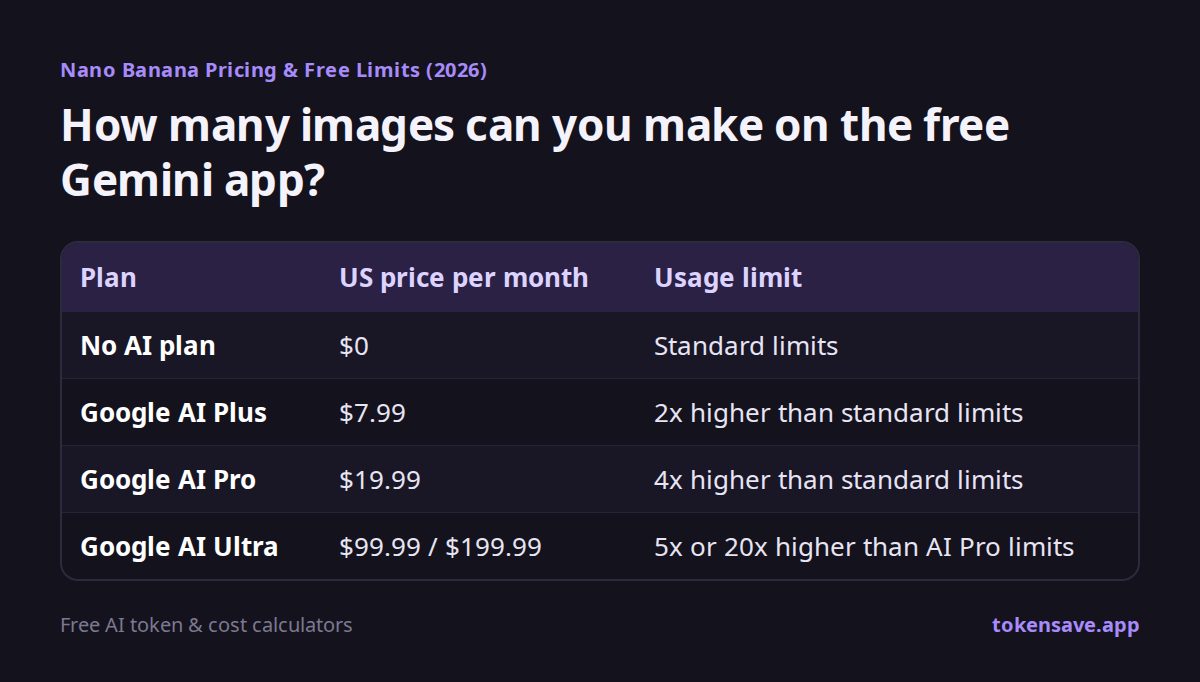
Google does not publish an image count any more. Here is what its help page says about each plan.
| Plan | US price per month | Usage limit |
|---|---|---|
| No AI plan | $0 | Standard limits |
| Google AI Plus | $7.99 | 2x higher than standard limits |
| Google AI Pro | $19.99 | 4x higher than standard limits |
| Google AI Ultra | $99.99 / $199.99 | 5x or 20x higher than AI Pro limits |
- Limits are based on compute, not on a number of messages. They refresh every 5 hours until you reach a weekly cap.
- Google says "some features (like media generation or Deep Research) will consume more of your usage." If you spend a session making images, you will hit the limit sooner than you would by chatting.
- "Redo images with Nano Banana Pro" is marked as available only on AI Plus and above. Free accounts don't get it.
Most "X images a day on the free plan" figures online come from older help pages or from someone's personal count. The current documentation has no number, so the only reliable way to know where you stand on a free account is to use it and see whether a limit notice appears.
I tested the free Gemini app
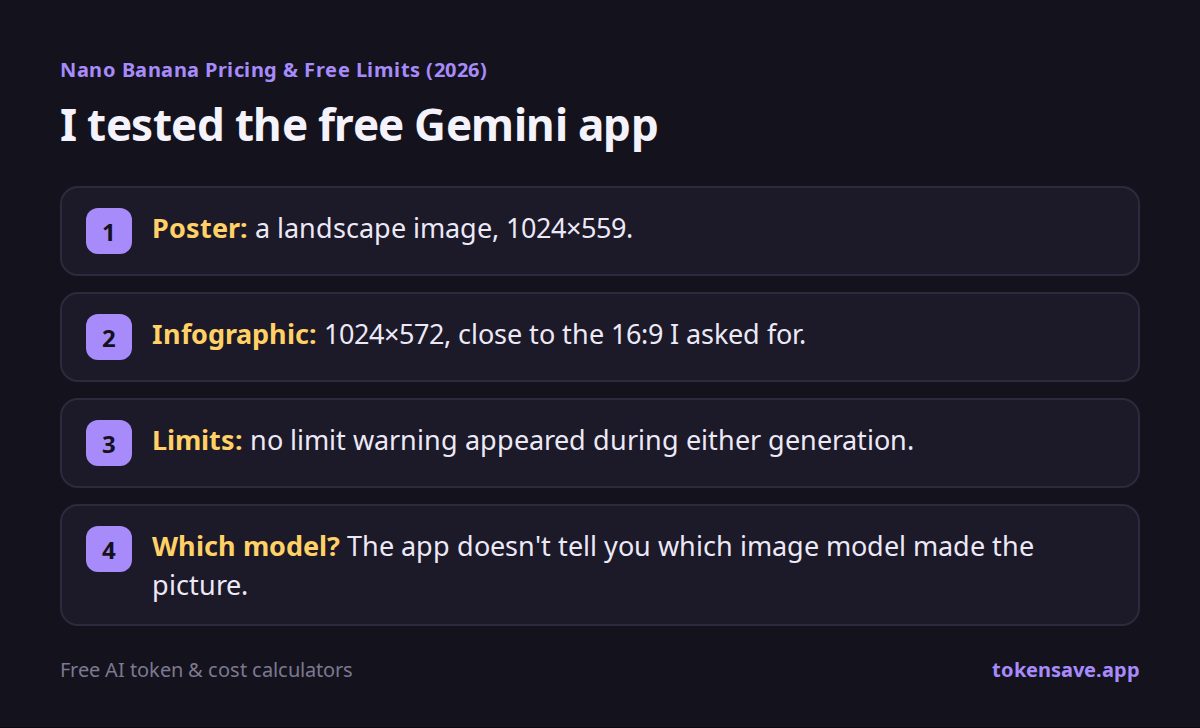
On October 14, I opened the Gemini app on a free Google account with no AI plan (the "Upgrade" button was showing in the top right corner) and left the model picker on its default setting. I used two prompts written to stress different things.
- Prompt 1, a poster with exact text: "A vintage travel poster for a fictional national park called "Silverpine Valley". Big title "SILVERPINE VALLEY" at the top, subtitle "Est. 1924 · Explore the Wild North" below it. A hiker with a red backpack standing on a ridge at sunrise. At the bottom, three small icons labeled "Hike", "Camp" and "Stargaze". Flat screen-print style with a limited 5-color palette."
- Prompt 2, an infographic with structure: "A clean 16:9 infographic titled "How Your Coffee Gets to You". Five numbered steps in a left-to-right flow: 1 Farm, 2 Harvest, 3 Roast, 4 Ship, 5 Brew. Each step has a small line icon and a one-line caption under it. Consistent icon style, thin connecting arrows, white background, one accent color #C46B2C, modern sans-serif type, no other text."
Each image appeared within about 30 seconds. What came back:
- Poster: a landscape image, 1024×559. Every word was spelled correctly and all three icons had their labels. The subtitle, though, came out in all caps ("EST. 1924 · EXPLORE THE WILD NORTH") instead of the mixed case I typed, and so did the icon labels.
- Infographic: 1024×572, close to the 16:9 I asked for. The title, the five numbered step names and the arrows were all there and correct, the icons matched in style, and the accent colour was used for the numbers and icons. One small slip: the caption under "Farm" says the cherries are "grown and harvested", which repeats the next step.
- Limits: no limit warning appeared during either generation.
- Which model? The app doesn't tell you which image model made the picture. Google's help page says free accounts generate with Nano Banana 2.
Both free images are 1024 pixels wide. If you need a 2K or 4K file, that is something you get from the API, not from the free app.
Testing Nano Banana 2.1 and Pro in AI Studio
Google AI Studio lets you pick the exact model, so I ran the same two prompts on Nano Banana 2.1 and Nano Banana Pro there, both at 1K with the aspect ratio left on auto. To be transparent: this test was done on an account with a Google AI Pro subscription, without an API key connected. On that account, AI Studio produced the images without charging anything, but it also showed a notice above the Run button saying the model requires a paid API key. What AI Studio lets you do for free can vary by account and change over time, and anything you build into an app or service will need a paid key in the end.
The output sizes differed from the free app. Nano Banana 2.1 returned the poster in portrait (848×1264) and the infographic at 1376×768. Pro returned both in landscape (1408×768 and 1376×768).
Free Gemini vs 2.1 vs Pro: is there a quality difference?
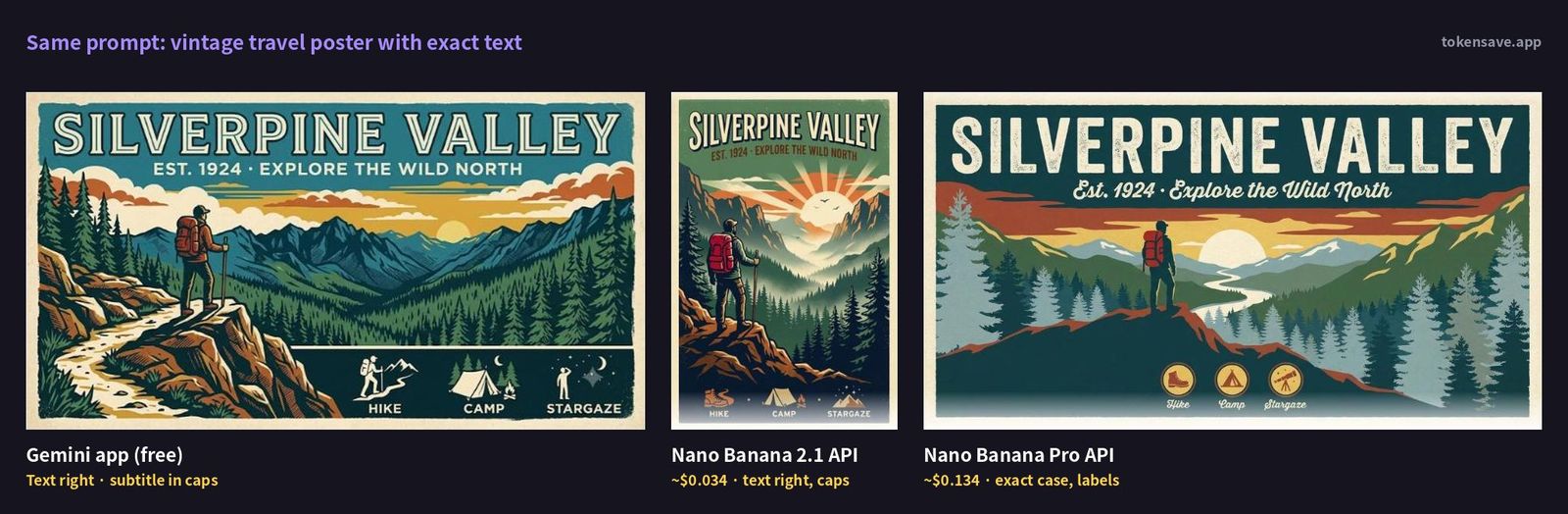
The poster is the kind of prompt Pro is supposed to win: exact text, specific casing and a layout with small labelled elements.
| Check | Gemini app (free) | Nano Banana 2.1 | Nano Banana Pro |
|---|---|---|---|
| Title "SILVERPINE VALLEY" | Correct | Correct | Correct |
| Subtitle wording | Correct | Correct | Correct |
| Subtitle in mixed case as typed | No, all caps | No, all caps | Yes, in a script face |
| Three labelled icons | Yes, caps | Yes, caps and small | Yes, mixed case in badges |
| Hiker with red backpack at sunrise | Yes | Yes | Yes |
All three got every word right, which is a real improvement over where image models were a year ago. The difference was in following the details: only Pro kept "Est. 1924 · Explore the Wild North" and "Hike / Camp / Stargaze" in the case I typed. If you are making a poster where the client signed off on exact copy, that matters. If you just need a nice-looking poster, the free version was arguably the most striking of the three.
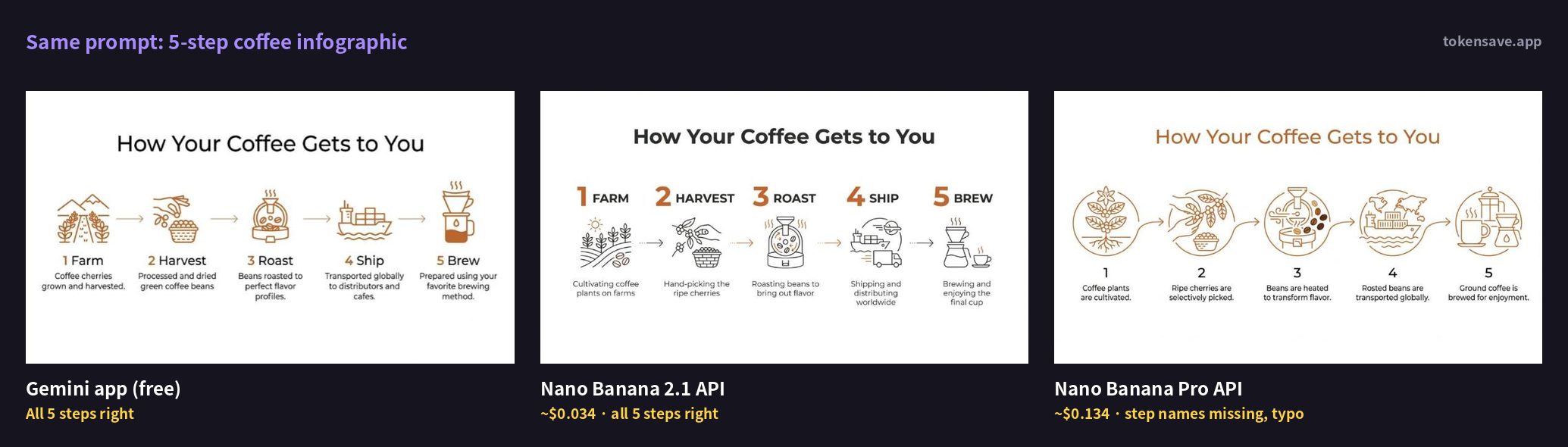
The infographic went the other way.
| Check | Gemini app (free) | Nano Banana 2.1 | Nano Banana Pro |
|---|---|---|---|
| Five step names (Farm … Brew) | All correct | All correct, in caps | Missing, numbers only |
| One-line captions | Correct | Correct | One typo ("Rosted") |
| Consistent line icons and arrows | Yes | Yes | Yes |
| Accent colour #C46B2C | Used | Used | Used, also on the title |
Nano Banana Pro, the most expensive model, dropped the five step names entirely and only drew the numbers, then misspelled "Roasted" in a caption. The free app and 2.1 both delivered exactly the structure I asked for. Nano Banana 2.1's version was the cleanest of the three, with large numbers and step names that read well at a glance.
So across two prompts, there was no clear winner. Pro was the most faithful on typography and casing, but it was also the only model that left out requested content. Keep in mind that this is one image per model per prompt, and image models are random: run the same prompt again and you may get a different result. What the test does show is that paying about 300% more per image for Pro does not guarantee fewer mistakes. Whatever model you use, read every word in the image before you publish it.
What does it cost for real workloads?
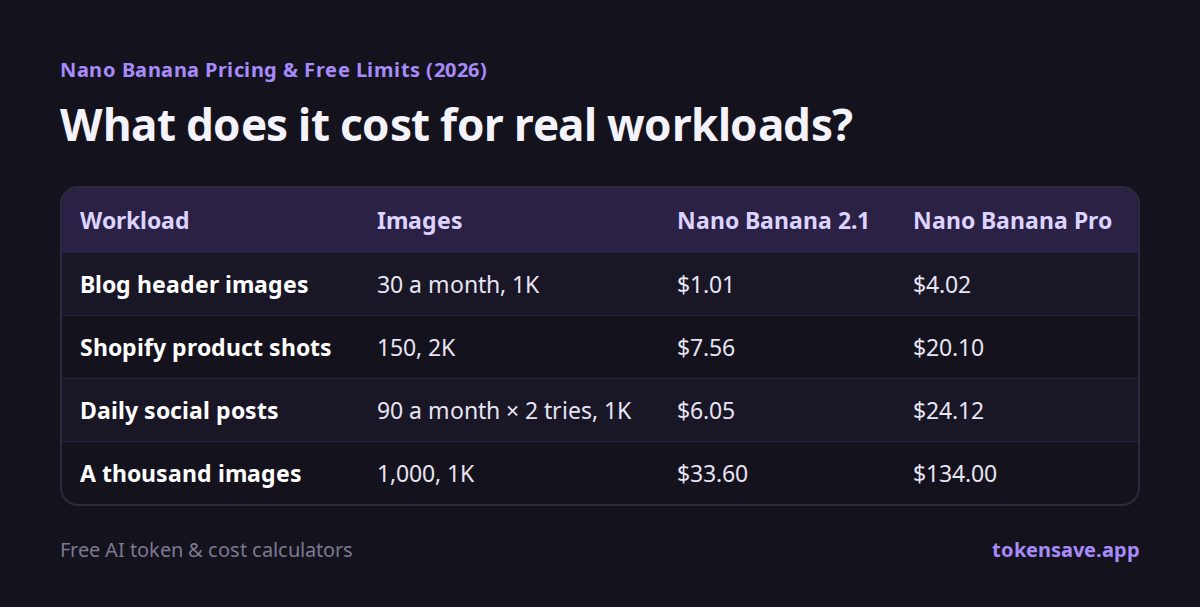
Here are some common jobs, priced at standard rates.
| Workload | Images | Nano Banana 2.1 | Nano Banana Pro |
|---|---|---|---|
| Blog header images | 30 a month, 1K | $1.01 | $4.02 |
| Shopify product shots | 150, 2K | $7.56 | $20.10 |
| Daily social posts | 90 a month × 2 tries, 1K | $6.05 | $24.12 |
| A thousand images | 1,000, 1K | $33.60 | $134.00 |
The social-post row assumes three posts a day for a month and two generations for each post, because the first try is not always the keeper. Send any of these through Batch and the cost is cut in half.
Header images for a blog cost about a dollar a month on 2.1. Compare that with a subscription: Google AI Pro is $19.99 a month in the US, and the same $19.99 buys roughly 595 1K images from Nano Banana 2.1 through the API. The difference is convenience. The API needs code, or a key pasted into another app, while the Gemini app works the moment you open it and also gives you the chatbot, storage and everything else in the plan.
Is Nano Banana expensive compared with other image AIs?
At $0.0336 for a 1K image, Nano Banana 2.1 sits at the cheaper end of the market. OpenAI's GPT Image prices vary widely with the quality setting, from about one cent to nearly 30 cents an image, and even within Google's lineup, Pro costs about 300% more than 2.1 at 1K. To compare per-image prices across models and resolutions side by side, try the AI image generation cost calculator. If you want the full cross-vendor table, see AI image generation cost per image, compared, and to estimate what your prompts cost in input tokens, paste them into the token counter.
What do you need to use Nano Banana through the API?
You need an API key even if you never write code yourself, because that is how other apps and automation tools connect to Nano Banana. The setup is short.
- Create an API key in Google AI Studio. Open the API keys menu (the key icon at the bottom left) and create a new key.
- Turn on billing. Because the image models have no free tier, the Google Cloud project behind your key needs a billing account before any image call will work. Depending on where you live, sales tax or VAT may be added.
- Set the model ID. If you are starting fresh, use gemini-nano-banana-2.1. Resolution (1K, 2K or 4K) and aspect ratio are chosen per request.
Treat the API key like a password. If it ends up in a public GitHub repo or a blog post, anyone can generate images on your bill. Once billing is on, set a budget alert in the Google Cloud console so a runaway script can't surprise you.
How to keep Nano Banana costs down
- Draft at 1K, finish at 2K or 4K. Explore compositions at the cheapest resolution and only re-render the keepers.
- Use Batch when you can wait. Same images, half the price.
- Edit in conversation instead of starting over. Nano Banana 2.1 is good at multi-turn edits, so describing what to change is usually cheaper than regenerating. Long conversations do add input tokens at $1.50 per million, so start a fresh thread once an edit session drags on.
- Save Pro for the final asset. Use it when exact typography and layout matter, then check its output as carefully as any other model's.
- Don't pay for 4K by default. At $0.113 on 2.1 and $0.24 on Pro, 4K only makes sense for print or large displays.
Which Nano Banana should you use?
- Starting out, or most everyday work: Nano Banana 2.1. Google recommends it for new projects, it is cheaper than Nano Banana 2, and it goes up to 4K.
- High volumes of 1K images, as fast as possible: Nano Banana 2 Lite. Same output price as 2.1, cheaper input, faster, but weaker at multi-turn edits and multiple references.
- Posters, packaging and brand work where exact text styling matters: Nano Banana Pro. It costs about 300% more than 2.1 at 1K, so a common pattern is to explore with 2.1 and render only the final image on Pro.
- Existing projects on Nano Banana 2: Google hasn't announced a shutdown date, but it now treats 2 as the previous generation. Moving to 2.1 lowers the output price; check that your input costs don't rise more than you save before you switch the model ID.
- No budget at all: the free Gemini app. In my test it got every word right on both prompts, at 1024 pixels wide.
FAQ
How much does Nano Banana 2.1 cost per image? On a standard request, $0.0336 at 1K, $0.0504 at 2K and $0.113 at 4K. Batch requests cost half.
Is there a free tier for the Nano Banana API? No. Google lists the free tier as "Not available" for every Nano Banana model. To try it for free, use the Gemini app or Google AI Studio.
How many images can I make on the free Gemini app? Google doesn't publish a number. Free accounts get "standard limits", which refresh every 5 hours up to a weekly cap, and image generation uses more of that allowance than text.
Can I still use the original Nano Banana (Gemini 2.5 Flash Image)? Not in the API. It was shut down on October 2, 2026, and calls to gemini-2.5-flash-image will fail. Google's notice points to Nano Banana 2 or 2 Lite as replacements, and 2.1 is cheaper than 2 for new work.
Is Nano Banana Pro worth about 300% more? It depends on the job. In my test, Pro was the only model to keep the exact casing on a poster, but it also left out the step names on an infographic and made a typo. For final, text-heavy brand assets it can be worth it; for drafts and social images, 2.1 or the free app did as well or better.
Summary
Nano Banana 2.1 is now the default, and through the API it costs $0.0336 for a 1K image, or $0.0168 with Batch. That is small enough that a blog or side project barely notices it. There is no free API tier, so start with the free Gemini app or AI Studio and move to the API once you need volume, higher resolutions or automation. Free app limits are based on usage, not image counts, and refresh every 5 hours. In my English tests, the free app, 2.1 and Pro all spelled every word correctly; Pro followed text styling best but was also the only one to drop content, so check every image whichever model you pay for.
Sources
- Gemini Developer API pricing (Google, updated 2026-10-13)
- Image generation with Nano Banana (Google documentation)
- Gemini API release notes: Nano Banana 2.1 generally available, October 6, 2026
- Gemini app limits and upgrades for Google AI subscribers (Google Help)
- Google AI plans (Google One)
- Google AI Ultra now starts at $100 (9to5Google, May 19, 2026)
- Google's AI subscription plans explained (TechCabal, June 5, 2026)
Checked on October 14, 2026. US plan prices are from the sources above. Google changes prices and limits often, so check the official pricing page before you subscribe or pay.
More articles
- ChatGPT Usage Limits 2026: Every Plan and the 5-Hour Window
- Indie Game Development Cost: Solo Dev Budget, Fees, Real $20 Case
- Grok API Pricing 2026: Grok 4.7, 4.3, Tools and Imagine Costs
- DeepSeek API Pricing 2026: Official Rates, Peak Hours, API Key
- Claude Pro Price 2026: What $20 Gets You, Limits, Free Trial
Pick a model, resolution and image count to compare Nano Banana with other image AIs.
Open the image cost calculator →