 TokenSave
Claude Sonnet 5.5 vs Opus 5.5: Same Game Prompt, Measured
Jonhisking · October 10, 2026
Claude Sonnet 5.5 costs 50% less per token than Opus 5.5. Does a cheaper price mean a worse result? On October 9, 2026, I gave Sonnet 5.5 the exact brick-breaker prompt from my Opus 5.5 effort test, once at medium and once at high, and compared time, tokens, cost and the finished game one-to-one against Opus 5.5. The cheapest run took 37 seconds and $0.25; the most expensive took 1 min 50 s and $0.75. I also played all four games and added what I've found using both models day to day.
Sonnet 5.5 vs Opus 5.5 pricing
Prices per million tokens, from Anthropic's official pricing page.
| Item | Sonnet 5.5 | Opus 5.5 | Difference |
|---|---|---|---|
| Input | $2 | $4 | Sonnet 50% cheaper |
| Output | $10 | $20 | Sonnet 50% cheaper |
| Cache write (5 min) | $2.50 | $5 | Sonnet 50% cheaper |
| Cache read | $0.10 | $0.20 | Sonnet 50% cheaper |
- For the same number of tokens, Sonnet is exactly 50% cheaper. But real cost depends on how many tokens each model uses to do the work, so I measured it with the same prompt.
- On both models, cache reads cost 5% of the input price. If a task re-reads the same documents or conversation, caching pays off on either one.
How I measured
- Setup: the same Windows PC and the same Claude Code as the Opus 5.5 effort test
- Prompt (verbatim): "Make a brick-breaker game that runs in the browser as a single file named index.html in the current folder. It needs 2 levels, a score display and 3 lives, and it must be playable with the keyboard and the mouse. Write the file and finish."
- Method: one run of Sonnet 5.5 with
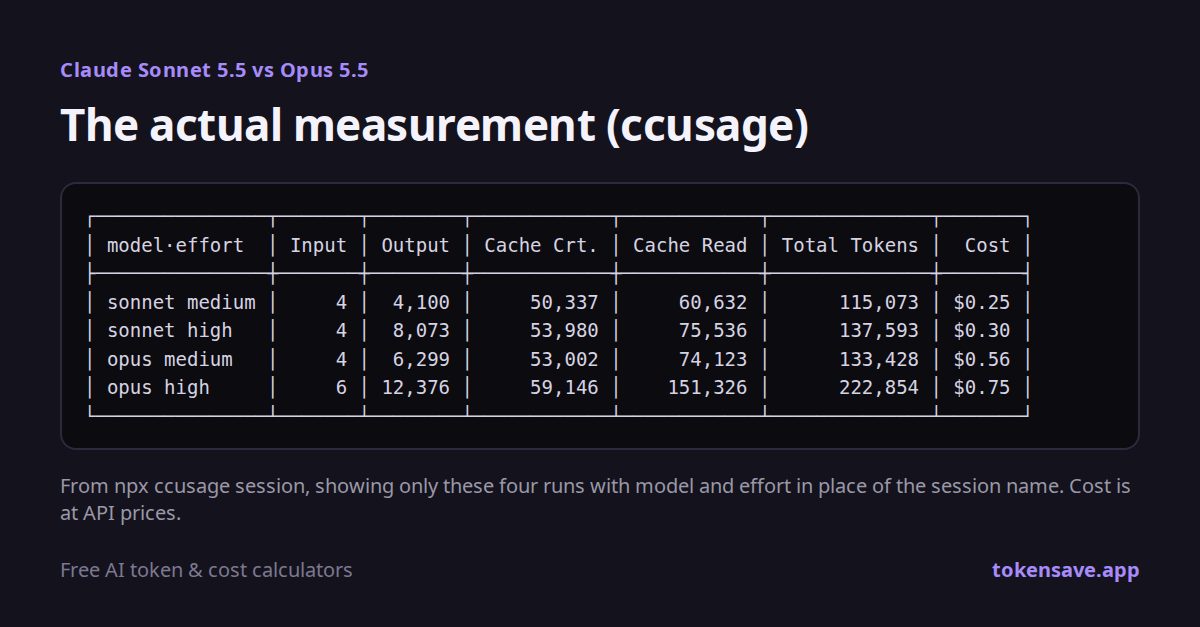
--effort mediumand one with--effort high, compared with the Opus 5.5 medium and high runs measured the same day. Each run used its own folder. - Measurement: tokens and cost with the free tool ccusage, time from start and end timestamps. Cost is converted at API prices.
Results: time, tokens and cost
| Model · effort | Time | Output tokens | Total tokens | Cost | Game code |
|---|---|---|---|---|---|
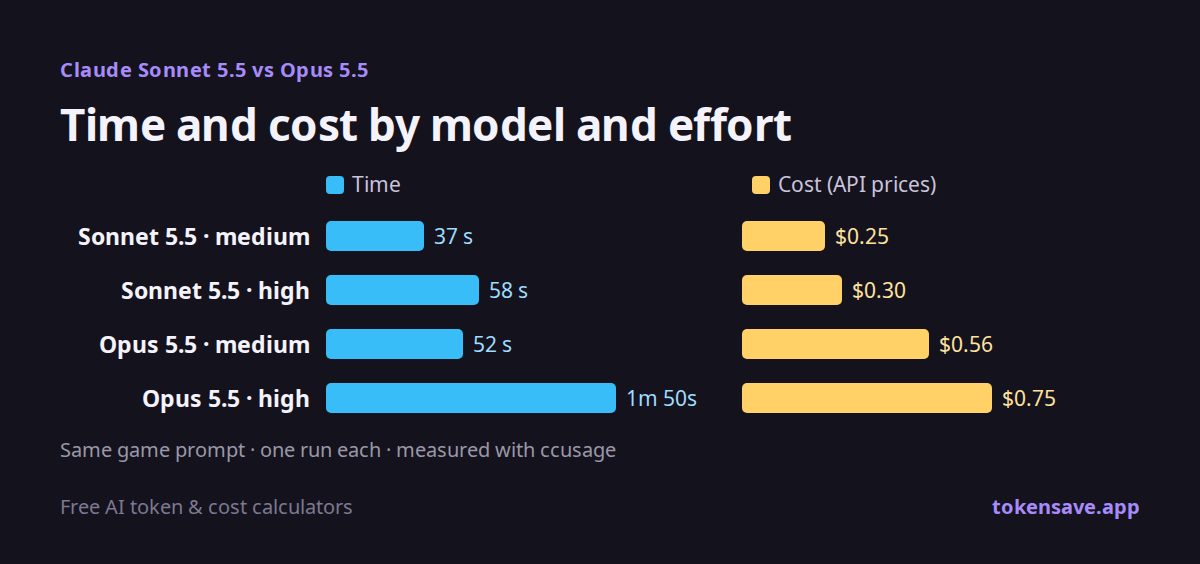
| Sonnet 5.5 · medium | 37 s | 4,100 | 115,073 | $0.25 | 198 lines |
| Opus 5.5 · medium | 52 s | 6,299 | 133,428 | $0.56 | 358 lines |
| Sonnet 5.5 · high | 58 s | 8,073 | 137,593 | $0.30 | 398 lines |
| Opus 5.5 · high | 1 min 50 s | 12,376 | 222,854 | $0.75 | 523 lines |
- At the same effort, Sonnet was 55–60% cheaper. Medium went from $0.56 to $0.25 (55% less) and high from $0.75 to $0.30 (60% less).
- It didn't just cost less per token, it used fewer tokens. Output tokens were 35% lower than Opus at both levels. The token gap on top of the 50% price gap pushed the savings past 50%.
- It was faster too. Sonnet was 29% faster at medium and 47% faster at high.
- The pairing worth noting: Sonnet high vs Opus medium. Sonnet high cost 46% less ($0.30 vs $0.56), took 6 seconds longer and wrote more code (398 vs 358 lines).
Comparing the four games
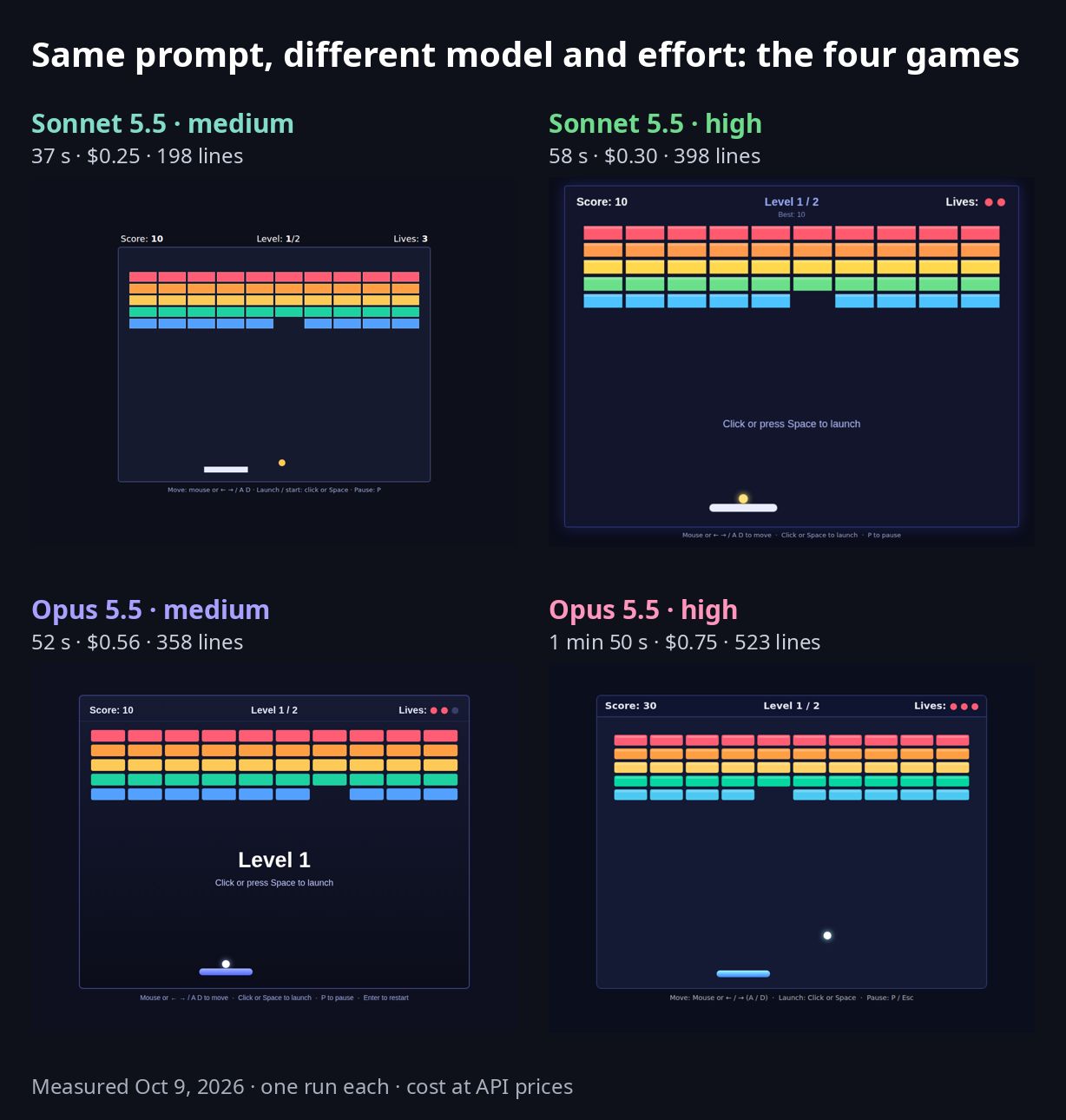
All four games ran without errors and had everything the prompt asked for (2 levels, score, 3 lives, keyboard and mouse controls). The difference is what each one added on top.
| Model · effort | What it added |
|---|---|
| Sonnet medium | Rainbow bricks, a checkerboard level 2 with a top row that takes two hits, pause |
| Opus medium | Rainbow bricks, bricks that take 2–3 hits (with hits left shown), pause and restart, auto-pause when the window loses focus |
| Sonnet high | Particle effects, saved high score, level-clear bonus, narrower paddle and faster ball in level 2, auto-pause |
| Opus high | Particle effects, saved high score, clear and lives-left bonus, touch controls |
- Sonnet high had nearly the same feature set as Opus high. The main thing missing was touch controls.
- Sonnet medium was the plainest. No sound or particle polish.
Detailed review by run
I played each game and checked the code alongside the summary each model left at the end. The Opus 5.5 medium and high reviews are in the effort comparison.
Sonnet 5.5 medium: 37 s, $0.25
- What it built: level 1 has 5 rows of bricks; level 2 is a 7-row checkerboard with a faster ball and a top row that takes two hits. There are game-over and win screens.
- Good: everything requested works. It was the fastest and cheapest of the four.
- Not so good: no game effects like sound or particles, and lives show as text instead of hearts. At 198 lines, the code is the shortest too.
- Use it for: prototypes where you only need to see it work, simple edits.
Sonnet 5.5 high: 58 s, $0.30
- What it built: level 2 is a 7-row layout with gaps and bricks that take two hits, plus a faster ball and narrower paddle.
- Good: particles burst when bricks break, and it added a saved high score, a level-clear bonus and auto-pause when the window loses focus. Lives show as red dots.
- Not so good: in the code, the two-hit bricks are marked only by a thin white border and a fade after the first hit, so they were hard to notice while playing. No touch controls.
- Use it for: everyday coding, cheap prototypes you can actually show people.
Hands-on impressions
This is how the two games felt to play, plus what I've found using Sonnet while building games. It's a feel, not a measurement.
Sonnet medium: plain, but it works
It's really simple, with no game effects and no hearts, so it feels flat, but functionally it works fine.
You can see the difference right away. Bricks just disappear with no effect, and lives are shown as the text "Lives: 3" instead of hearts. Still, nothing the prompt asked for is missing: score, 2 levels, 3 lives, keyboard and mouse. Read as a checklist, it passes. Played as a game, it feels unfinished. For "let's just see if it runs," that's enough.
Sonnet high: Opus high level, with one weak spot
It's work on the level of Opus 5.5 high. The particles came out well. Every brick throws off pieces when it breaks, which feels completely different from medium. With a saved high score and a level-clear bonus as well, on screen alone it holds up next to Opus high.
But it made the two-hit bricks so that the player can't tell them apart. In the code, they're marked only by a thin white border and fade a little after the first hit. From the player's side, a brick that looks like every other one doesn't break when you hit it, which can feel like a bug. The feature is there; the finishing touch that shows it to the player is missing.
Using Sonnet day to day
Even when I described what I wanted in detail, it often didn't come out quite right. It can build the features, but getting to the detail I want means asking for more again and again. So I think I went through the build-fix, build-fix loop more often than with Opus.
The two-hit bricks in this Sonnet high run fit the same pattern. It built the feature "bricks that take two hits," but the detail "so the player can see it at a glance" would take another request.
What that means for cost
This test was a small game finished in one request, so that difference didn't show up in the numbers. As simple arithmetic, two more Sonnet high requests of the same size bring it to $0.90, more than one Opus high run ($0.75). Real fix-up requests vary in size, so costs vary too, but the more rounds of fixes you need, the faster Sonnet's lower price advantage shrinks.
Which model for which task
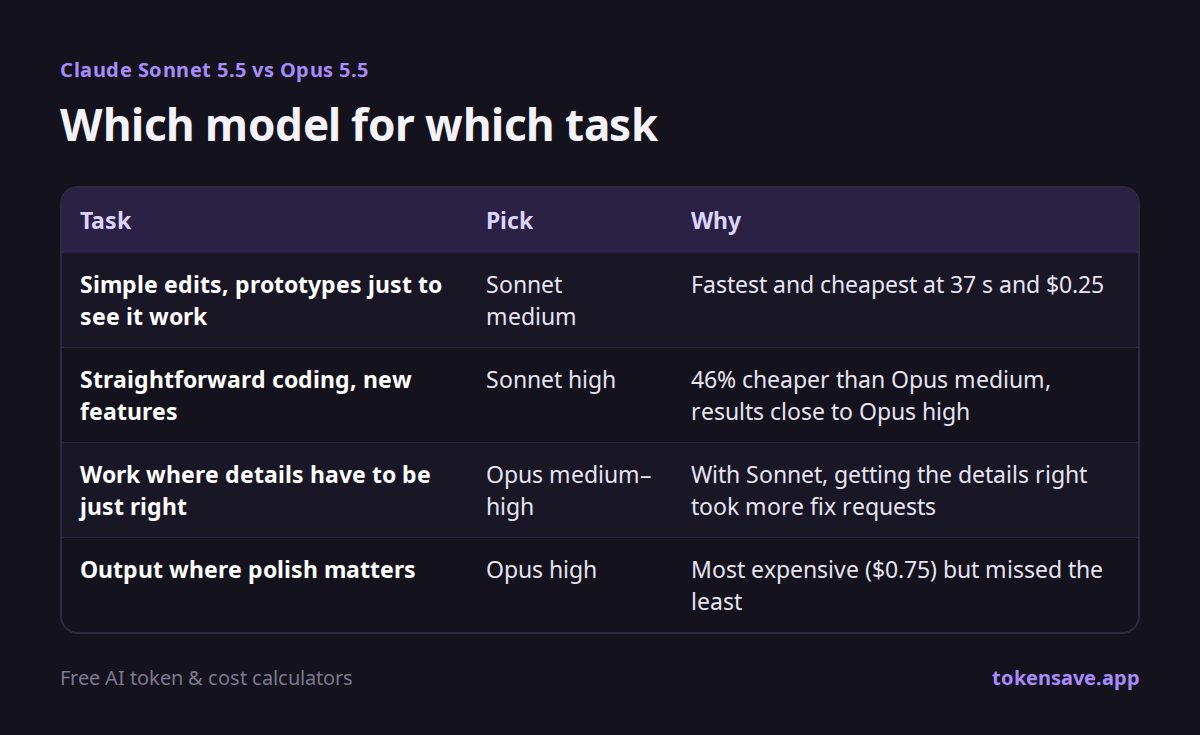
Recommendations combining the measurements with hands-on use.
| Task | Pick | Why |
|---|---|---|
| Simple edits, prototypes just to see it work | Sonnet medium | Fastest and cheapest at 37 s and $0.25 |
| Straightforward coding, new features | Sonnet high | 46% cheaper than Opus medium, results close to Opus high |
| Work where details have to be just right | Opus medium–high | With Sonnet, getting the details right took more fix requests |
| Output where polish matters | Opus high | Most expensive ($0.75) but missed the least |
- Caveat: one run each, on one small game. Bigger projects or harder problems may show different gaps.
- Count the fixes. If the job is done in one pass, Sonnet is clearly cheaper. If you need several rounds of fixes to get what you want, cost and time go up with every round.
Verdict: Sonnet high for straightforward work, Opus for detail
- The best value was Sonnet 5.5 high. At $0.30 it was 46% cheaper than Opus medium ($0.56), and the result was on the level of Opus high.
- Sonnet medium is fast and cheap but plain. It works, but it has no game effects.
- When details have to be right, use Opus. In the test, Opus high missed the least, and in daily use Sonnet needed more fix rounds to reach the detail I wanted.
FAQ
How much cheaper is Sonnet 5.5 than Opus 5.5? Per-token prices are 50% lower for both input and output. In this test Sonnet also used 35% fewer tokens, so the actual cost at the same effort was 55–60% lower.
Can Sonnet 5.5 build a game? Yes. In this test, both Sonnet medium and high built games with every requested feature and no errors. High even added particle effects and a saved high score.
So when should I use Opus 5.5? When there are many details and they need to be exact. Sonnet was enough for work that's done in one pass, but detailed requirements often took several rounds of fixes.
Run the numbers for your own work
In the coding agent cost calculator, enter task size and tasks per day to compare a month on Opus 5.5 and Sonnet 5.5. Check a single prompt's cost in the token counter. For the differences between Opus 5 and 5.5, see Claude Opus 5 vs 5.5.
Measured October 9, 2026. Costs are ccusage conversions at API prices; results can change with model and Claude Code updates.
Sources
More articles
- Muse Spark 1.3 API Pricing: Meta's Model vs Claude, GPT-6 and Gemini
- GPT-6.1 Sol Ultrafast: Price, Speed and When It's Worth It
- Claude Opus 5 vs 5.5: Price, Performance and a Real Test
- Claude Opus 5.5 Effort Levels Tested: Low to Max
- ChatGPT Pro 500 vs 200 vs 100: Price, Limits and Which to Pick (2026)
Enter task size and tasks per day to compare a month on Opus 5.5, Sonnet 5.5 and GPT-6 Sol.
Open the coding agent cost calculator →